
This is the instruction sheet for the SKMEI 1456, the square digital watch with a metal case and bracelet. If you lost the paper that came in the box, everything is here, step by step.
The Four Buttons
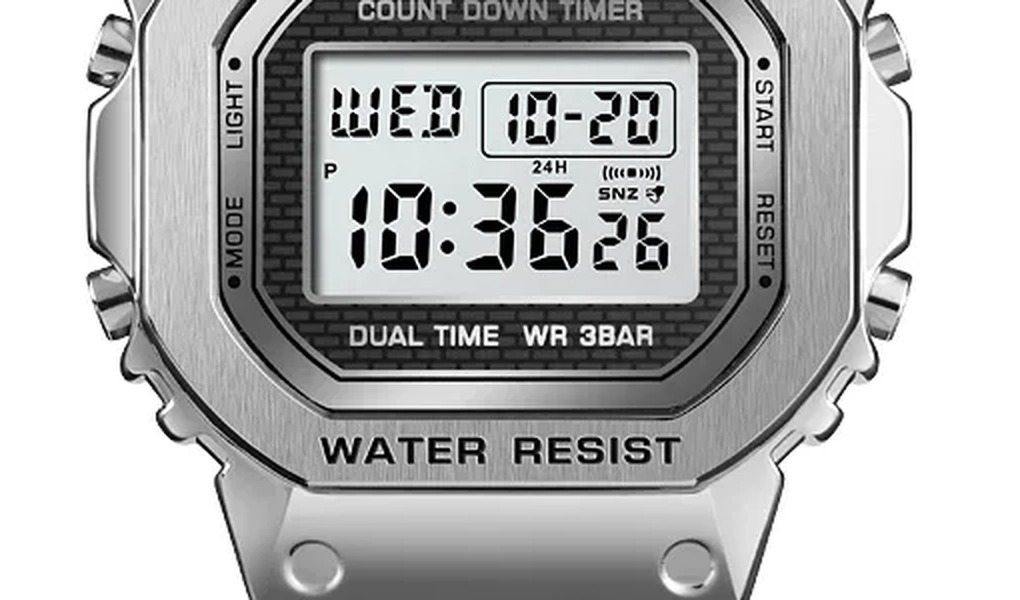
The name of each button is printed on the bezel, next to it:
- LIGHT (top left): turns on the backlight.
- MODE (bottom left): moves between modes. In a setting screen, it moves to the next item.
- START (top right): starts and stops the stopwatch and the timer. In a setting screen, it changes the flashing value.
- RESET (bottom right): resets the stopwatch. Hold it to open a setting screen, and press it again to save and exit.
Switching Between Modes
Each press of MODE takes you to the next mode, in this order:
- Time (day of the week, date and time)
- Alarm (AL on the screen)
- Stopwatch (ST)
- Dual Time (DT), a second time zone
- Countdown Timer (TR)
One more press of MODE takes you back to the time.
Setting the Time and Date
- On the time screen, hold RESET until the seconds start to flash.
- Press START to reset the seconds to 00. If the seconds are between 30 and 59, the minutes also go up by one.
- Press MODE to move to the next item, in this order: seconds, hour, minutes, year, month, day.
- While an item is flashing, press START to change it.
- Press RESET to save and exit.
The day of the week updates by itself from the date. The year goes from 2000 to 2099, and the calendar already accounts for short months and leap years.
12-Hour or 24-Hour Time
On the time screen, press START to switch between 12 and 24 hours. In 12-hour mode, a P next to the hour means PM. The format you choose is used in every mode.
Setting the Alarm
- Press MODE once to go to the alarm (AL).
- Hold RESET until the alarm hour flashes.
- Press MODE to move between hour, minutes, month and day, and START to change the flashing value.
- For an alarm that rings every day, leave the month at “-” and the day at “–” (press START until these marks appear).
- Press RESET to save and exit.
If you also set a month and a day, the alarm rings only on that date. With only a day, it rings once a month on that day. With only a month, it rings every day of that month. In 12-hour mode, check the P indicator so you do not set the alarm for the wrong half of the day.
Alarm On/Off, Snooze and Hourly Chime
- Alarm and snooze: on the alarm screen, press RESET to turn the alarm and the snooze (SNZ) on or off. The icons stay on the display in every mode while they are on.
- The alarm rings for about 10 seconds. With snooze on, it repeats every 5 minutes, up to 6 times. Press any button to stop it.
- Hourly chime: in the alarm mode, press START to show the :00 screen, then press RESET to turn it on or off. “SIG” on the display means the chime is on.
Stopwatch
Press MODE twice to reach the stopwatch (ST). It counts up to 23:59:59.99, in hundredths of a second, and keeps running even if you go to another mode.
- Start and stop: press START. Press START again to continue from where it stopped.
- Clear: with the stopwatch stopped, press RESET.
- Split time: while it is running, press RESET. The split time freezes on the screen (SPL) while the stopwatch keeps counting. Press RESET again to go back to the running time.
- Two runners: press START at the start, RESET when the first one finishes (their time stays on screen), START when the second one finishes, RESET to see the second time and RESET again to clear.
Dual Time (Second Time Zone)
- Press MODE three times to reach dual time (DT).
- Hold RESET until the hour flashes.
- Press MODE to move between hour and minutes, and START to change them.
- Press RESET to save and exit.
Countdown Timer
Press MODE four times to reach the timer (TR). It goes from 1 minute to 24 hours.
- Hold START until the hour flashes.
- Press MODE to move between hour and minutes, and START to change them.
- Press RESET to save and exit.
- Press START to begin the countdown. Press START again to pause and once more to continue.
- To go back to the starting time, pause the timer and press RESET.
When it reaches zero, the alarm rings for 15 seconds, or until you press any button, and the timer goes back to its starting time. The countdown keeps running even if you go to another mode.
Backlight
Press LIGHT in any mode. The screen lights up for about 2 seconds.
Water and Care
- The 1456 is 3 Bar (30 m) water resistant: rain, splashes and hand-washing are fine. Do not swim or shower with it, and do not press the buttons underwater.
- Keep it away from hot water, steam, perfume and cleaning products. Wipe the case and bracelet with a soft, dry cloth.
- Battery: CR2025. Have it changed at a watch shop, so the back is sealed correctly. After a battery change, set the date again.
Still Need Help?
Email support@shopskmei.com with your question, and the model number printed on the back of the case. For other SKMEI digital models, see our general guide on how to set an SKMEI digital watch. The watch itself is here: SKMEI 1456 Square Steel Digital Watch.