
Step-by-step guide for the SKMEI 1848. The button names are printed on the watch case.
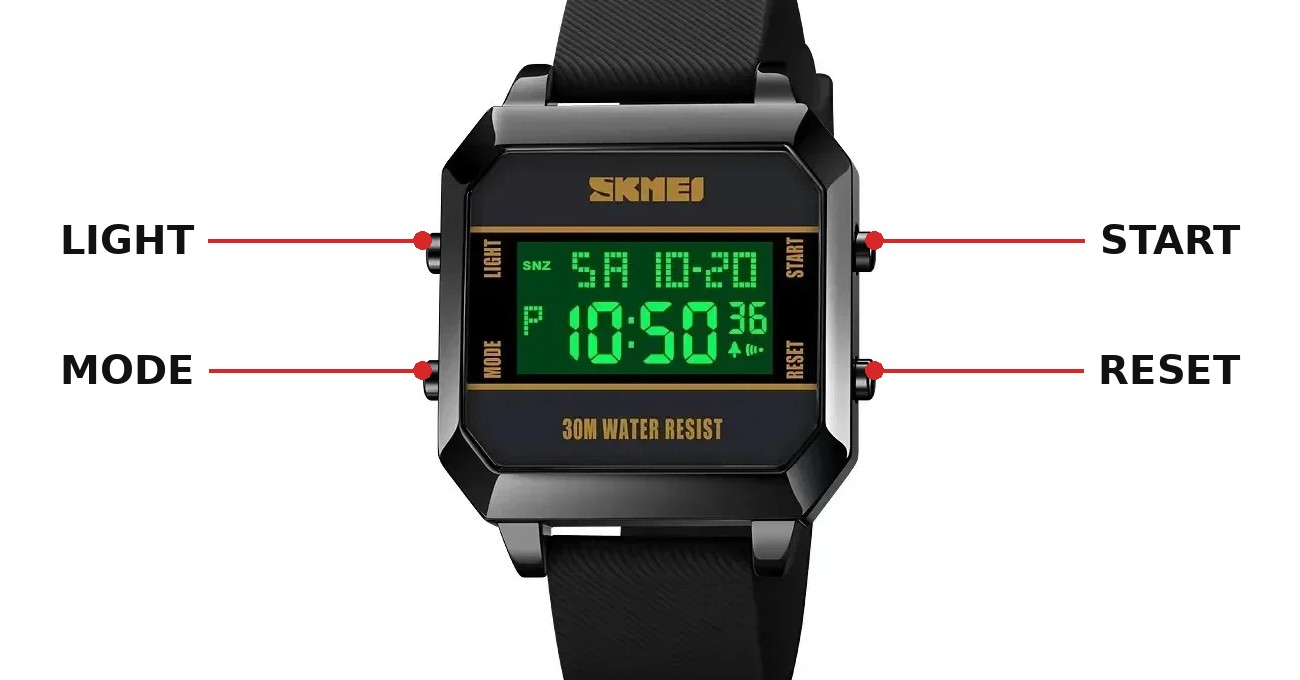
Set the Time and Date
- On the time screen, hold RESET for 3 seconds until the seconds flash.
- Press START to change the flashing number. On the seconds, it sets them to 00.
- Press MODE to go to the next item: seconds, hour, minute, year, month, day.
- Press RESET to finish. The weekday updates by itself.
Switch Between 12-Hour and 24-Hour Time
On the time screen, press START. In 12 h format, a P next to the hour means PM.
Alarm On/Off
- Press MODE until the alarm screen shows.
- Press START to switch the alarm on or off. When it is on, the alarm icon (and SNZ, if snooze is on) stays on the display.
- Press MODE to go back to the time.
When the alarm rings, it sounds for about 10 seconds. Press any button to stop it. With snooze on, it rings again every 5 minutes (up to 6 times).
Set the Alarm Time
- On the alarm screen, hold RESET until the hour flashes.
- Press START to change the number and MODE to go to the next item.
- For an alarm every day, leave the month and the day as – (press START until the dash shows).
- Press RESET to finish.
Hourly Chime
On the alarm screen, press START until :00 shows, then press RESET to turn the hourly beep on or off.
Countdown Timer
- Press MODE until the countdown screen shows.
- Hold START until the hour flashes. Press START to change and MODE to move to the minutes. Press RESET to finish (1 minute to 24 hours).
- Press START to start or pause. To reset, pause and press RESET.
Light
Press LIGHT at any time to light up the screen.
Something not working as described? Contact us and tell us what the screen shows. We’ll help you right away.