
This is the user guide for the SKMEI 2647, the slim rectangle digital watch with big numbers. If you lost the paper that came in the box, or the watch arrived without one, you will find everything here.
Good to know: the 2647 is a new SKMEI model, and SKMEI has not published its printed leaflet online yet. The buttons, the display and the specs below come from SKMEI’s own drawings of this watch. The setting steps follow the official leaflet of SKMEI’s other two-button watches. If your watch does something different at any step, write to us and tell us what you see. We will help you right away.
The Two Buttons
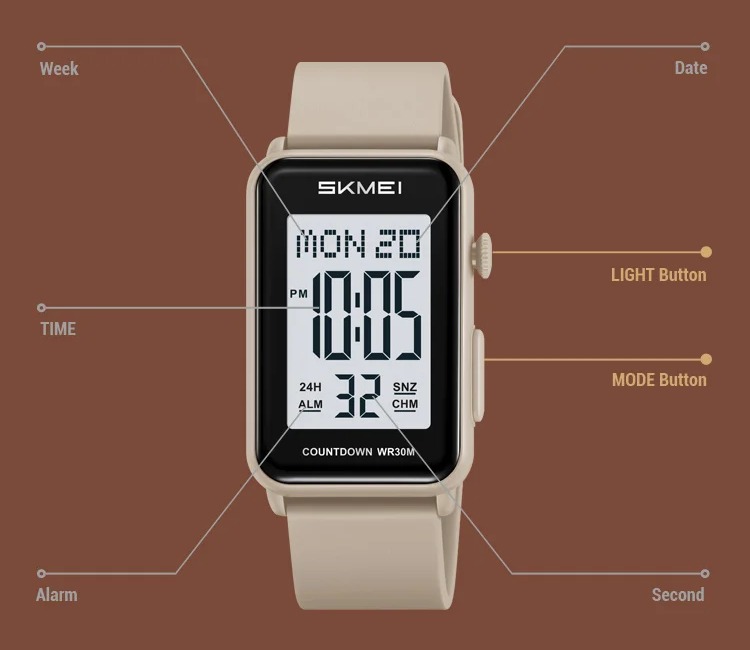
Both buttons are on the right side of the case:
- LIGHT (top, the round crown): turns on the EL backlight. On a setting screen it is also the button that opens the setting and moves to the next item.
- MODE (bottom, the long button): moves from one mode to the next. On a setting screen it changes the number that is flashing.
While you are setting something, the light button does not turn on the light. This is normal: it is busy moving between items.
Reading the Display
| On the screen | What it means |
|---|---|
| MON 20 (top line) | Day of the week and date |
| Big digits | Hour and minutes |
| PM | Afternoon or evening, in 12-hour format |
| Small digits (bottom) | Seconds |
| 24H | The watch is in 24-hour format |
| ALM | The daily alarm is on |
| SNZ | Snooze is on |
| CHM | The hourly chime is on (a short beep on every full hour) |
The Modes
The 2647 has four modes: time, alarm, stopwatch and countdown timer. Each press of MODE takes you to the next one. There is no back button, so keep pressing MODE until you are back at the time.
Setting the Time and Date
- Press MODE until you are on the time screen.
- Hold LIGHT for about 2 to 3 seconds, until the seconds start to flash.
- Press MODE to reset the seconds to 00.
- Press LIGHT to move to the next item: hour, minutes, 12/24h, then month, day and day of the week (the order can change a little from watch to watch; just follow what is flashing).
- While an item is flashing, press MODE to change it. Hold MODE to change it faster.
- When you are done, wait about a minute without touching anything. The watch saves and goes back to the time on its own.
If holding LIGHT only turns on the light: try holding MODE for 3 seconds instead. On that version, MODE opens the setting and LIGHT changes the flashing number. If neither works, contact us.
Tip: set the seconds when they reach a full minute on your phone. If the seconds are between 30 and 59 when you reset them, the minutes usually go up by one.
12-Hour or 24-Hour Time
The 12/24h choice is one of the items in the time setting (see above). In 24-hour format you will see 24H on the screen. In 12-hour format, PM appears in the afternoon and evening. Check PM when you set the alarm, so it does not ring at 7 at night instead of 7 in the morning.
Setting the Alarm
- Press MODE until you reach the alarm screen.
- Hold LIGHT until the alarm hour flashes.
- Press MODE to change the hour. Press LIGHT to move to the minutes and change them with MODE.
- Press LIGHT again to reach the on/off item for the alarm and the hourly chime, and use MODE to switch them.
- Wait about a minute without touching anything to save.
Alarm On/Off, Snooze and Hourly Chime
- The alarm and the hourly chime are turned on or off in the last step of the alarm setting (see above). Watch the ALM, SNZ and CHM marks to see what is on.
- When the alarm rings, press any button to stop it. With snooze on, it rings again a few minutes later.
- The marks stay on the screen in every mode, so you can always see if the alarm is set.
Stopwatch
- Press MODE until you reach the stopwatch.
- Press LIGHT to start and to stop.
- To reset it to zero, stop it first, then hold LIGHT for 2 seconds.
Countdown Timer
- Press MODE until you reach the countdown (timer) screen.
- Hold LIGHT until the numbers flash, set the time with MODE, and use LIGHT to move between hours, minutes and seconds.
- Wait a few seconds to save, then press LIGHT to start and stop the countdown.
- When it reaches zero, the watch beeps. Press any button to stop the sound.
The Backlight
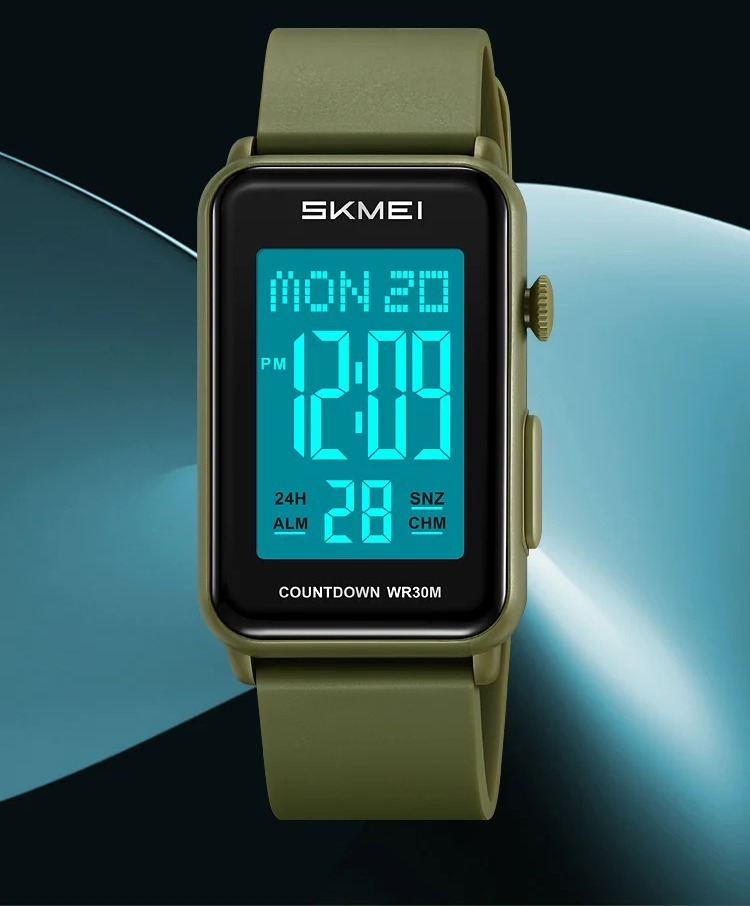
Press LIGHT once, in any mode, and the whole screen glows for about 3 seconds. Using the light a lot makes the battery run out sooner, so there is no need to hold the button down.
Water Resistance (3 Bar / 30 m)
The dial says WR30M. Despite the “30 m”, this does not mean you can dive or swim with it. It means:
- OK: sweat, rain and splashes.
- Not OK: swimming, showering, the pool, the sea, washing hands under a strong tap, or hot water (sauna, hot tub).
- Never press the buttons when the watch is wet.
Battery and Care
- When the screen gets faint or the light gets weak, the battery is running low. Take it to a watch shop to change it: opening the back yourself can damage the rubber seal that keeps water out.
- Clean the case and the strap with a soft, damp cloth and dry them well. Do not use alcohol or other chemicals on the screen.
- Keep the watch away from strong heat (a car dashboard in the sun, for example) and from strong magnets.
- If the watch freezes or shows strange numbers, a battery change usually fixes it.
If Something Looks Wrong
| What you see | What to do |
|---|---|
| The light does not turn on | You are probably on a setting screen. Wait a minute for the watch to return to the time, then try again. |
| Numbers keep flashing | The watch is in setting mode. Wait about a minute without touching anything and it goes back by itself. |
| The alarm did not ring | Check that ALM is on the screen and that AM/PM is right in the alarm time. |
| The time is 12 hours off | In 12-hour format, check the PM mark and set the hour again. |
| The screen is faint or blank | The battery is low. Take it to a watch shop for a new one. |
| Fog under the glass | Water got in. Stop using it in water and contact us. |
Specifications
| Item | SKMEI 2647 |
|---|---|
| Display | Digital |
| Case | ABS, 49.8 x 29.3 mm, 9.5 mm thick |
| Glass | Mineral glass |
| Strap | TPU (soft rubber), 20 mm wide, 250 mm total length, stainless-steel buckle |
| Weight | 40.2 g |
| Water resistance | 3 Bar (30 m) |
| Functions | Time, day, date, 12/24h, alarm, snooze, hourly chime, stopwatch, countdown, EL backlight |
Need Help?
If something here does not match your watch, or you are stuck at any step, send us a message with your order number and what the screen shows. A short video or photo helps a lot. You can also see the watch again on the SKMEI 2647 page.